 The Field List
The Field List
The field list contains all fields that will be included in your template.
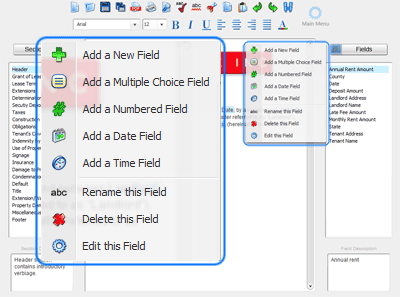
Add a New Field - Adds a standard field to your template. When a document is created with the template, the author will be prompted to provide text which will replace the field in the document.
Add a Multiple Choice Field - Adds a multiple choice field to your template. When a document is created with the template, the author will be prompted to select text which will replace the field in the document. The choices available to the document author are set by the template.
Add a Numbered Field - Adds a numbered field to your template. When a document is created with the template, numbered fields will be created automatically with no input from the document author. Numbered fields automatically adjust to account for deletions and section addition/removal.
Add a Date Field - Adds a date field to your template. When a document is created with the template, date fields will be created automatically with no input from the document author.
Add a Time Field - Adds a time field to your template. When a document is created with the template, time fields will be created automatically with no input from the document author.
Rename this Field - Renames the selected field.
Delete this Field - Removes a selected field.
Edit this Field - Edit the name, description or other characteristics of a field.