 The Document Section
List
The Document Section
List
The Document Section
List
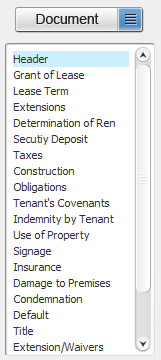
The document section list shows every section that has been added to your document. These sections comprise the body of your final document.
Up Arrow - Moves the selected section up (towards the beginning of your document)
Down Arrow - Moves the selected section down (towards the end of your document)
'X' Button - Removes the highlighted section from your document
Alternatively, sections can be manipulated by right clicking on a section and choosing one of four options from the popup menu:
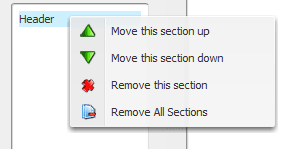
Move this section up - Moves the highlighted section towards the front of your document
Move this section down - Moves the highlighted section towards the back of your document
Remove this section - Removes the highlighted section from your document
Remove All Sections - Removes all sections from your document
Related Help: